What You'll Learn
- Why traditional PABX systems fail during load shedding and VoIP doesn't
- The exact hardware setup to keep your VoIP phones online for 8+ hours
- How automatic mobile failover works on YIP WebPhone
- Step-by-step configuration for call routing during outages
- Cost of a load-shedding-proof phone setup vs. a generator
The Real Cost of Missed Calls During Load Shedding
South Africa loses an estimated R900 million per day in economic output during Stage 6 load shedding. For small and medium businesses, a significant chunk of that loss comes from one simple problem: the phone goes dead.
A client calls your main number. It rings out. They call a competitor. You never know it happened.
This isn't a hypothetical. If your business runs on a traditional PABX connected to PSTN lines, your entire phone system is powered by mains electricity. When Eskom cuts the power, your phones cut out — usually within 30 to 60 minutes once the UPS runs flat.
VoIP changes this equation entirely. Here's how.
Why Traditional PABX Fails and VoIP Doesn't
A traditional PABX (Private Automatic Branch Exchange) is a physical box — usually mounted in a server room or comms cabinet — that routes all your internal and external calls. It requires:
- Mains power to operate
- Physical copper lines (PSTN) connected to the wall
- On-site hardware that can't be moved or accessed remotely
When load shedding hits, the PABX goes offline. Even if you have a UPS, most PABX units draw enough power to drain a standard UPS in under an hour.
VoIP works differently. Your calls route through the internet. The "PABX" is a cloud server in a data centre with its own redundant power supply — it never goes offline. The only thing that needs to stay powered at your premises is:
- Your internet router (draws ~10–15W)
- Your VoIP handsets or the devices running the softphone app
A R500 UPS can keep a router running for 6–8 hours. Your team's smartphones don't need a UPS at all — they run on battery.
The YIP WebPhone Load-Shedding Setup
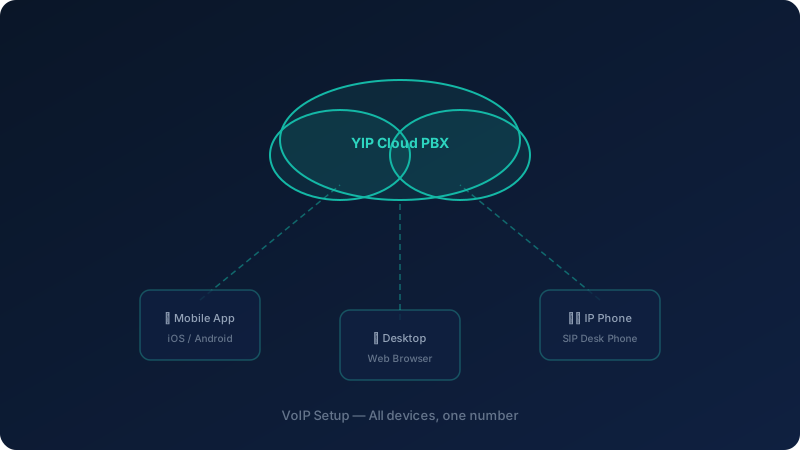
Here's the exact setup SA Telecoms recommends for load-shedding resilience:
Layer 1 — Keep the Router Online
Your fibre or LTE router is the only piece of infrastructure you need to protect at the premises level.
Recommended: A mini UPS specifically designed for routers (brands like Mecer or Ellies sell these for R400–R800). These provide 4–8 hours of runtime for a standard router.
LTE backup: If your fibre goes down during load shedding (some fibre providers lose backhaul), configure your router to fail over to an LTE SIM. Most modern routers support this natively.
Layer 2 — Mobile Failover on YIP WebPhone
This is where YIP WebPhone earns its keep. In the YIP WebPhone dashboard, you configure simultaneous ring or sequential failover:
- Simultaneous ring: When someone calls your office number, it rings both the desk phone/softphone AND your mobile simultaneously. First to answer wins.
- Sequential failover: Desk phone rings for 15 seconds, then automatically diverts to mobile if unanswered.
During load shedding, your desk phones may be offline — but the call still reaches your team on their smartphones. The caller dials the same number. Nothing changes from their perspective.
Layer 3 — Auto-Attendant Stays Live
Your auto-attendant (IVR) runs in the cloud. Even if every device at your premises is offline, callers still hear your professional greeting and can leave voicemails — which get emailed to you as audio attachments.
Step-by-Step: Configuring Load-Shedding Failover on YIP WebPhone
Step 1 — Install the YIP WebPhone App on Mobile
Every team member should have the YIP WebPhone mobile app installed on their smartphone. This takes about 5 minutes:
- Download from the App Store or Google Play
- Log in with your YIP WebPhone credentials
- Enable push notifications for incoming calls
- Test with an internal call
Step 2 — Set Up Simultaneous Ring
In your YIP WebPhone admin dashboard:
- Go to Extensions → [Your Extension] → Call Forwarding
- Enable Simultaneous Ring
- Add your mobile number as the simultaneous ring destination
- Set a ring timeout (15–20 seconds recommended)
- Save and test
Step 3 — Configure After-Hours and Outage Routing
Create a dedicated load-shedding schedule in your call routing:
- Go to Call Routing → Time Conditions
- Create a condition called "Load Shedding"
- Route to a ring group that includes all mobile numbers
- Activate this manually when load shedding starts (or use the schedule if you know your slot)
Step 4 — Set Up Voicemail-to-Email
Ensure every extension has voicemail-to-email enabled:
- Go to Extensions → Voicemail Settings
- Enter the email address for each extension
- Enable Email Notification with Attachment
- Test by leaving a voicemail — it should arrive in your inbox within 60 seconds
What About Power for Desk Phones?
If you use physical VoIP handsets (like Yealink or Grandstream), they're powered by PoE (Power over Ethernet) from your network switch. Your switch also needs to stay powered.
Solution: Add your network switch to the same UPS as your router. A standard 8-port PoE switch draws 30–60W. A R1,200 UPS can power both your router and switch for 4–6 hours.
Total hardware cost for a load-shedding-proof VoIP setup:
- Mini router UPS: R500–R800
- Network switch UPS (if using desk phones): R800–R1,200
- Total: R1,300–R2,000 once-off
Compare this to a generator: R15,000–R50,000 plus fuel costs. For phone continuity alone, the VoIP + UPS approach is the clear winner.
Real-World Scenario: Stage 6, 4-Hour Outage
Here's what happens to a 10-person business on YIP WebPhone during a 4-hour Stage 6 outage:
| Time | Event |
|---|---|
| 10:00 | Load shedding starts |
| 10:00 | Router stays online (on UPS) |
| 10:00 | Desk phones stay online (switch on UPS) |
| 10:00 | Mobile apps already active on all smartphones |
| 10:15 | Client calls main number — rings desk phone + mobile simultaneously |
| 10:15 | Staff member answers on desk phone as normal |
| 12:30 | UPS runs low — desk phones go offline |
| 12:30 | Calls automatically route to mobile apps only |
| 14:00 | Power restored — desk phones come back online automatically |
Calls missed: 0. Revenue lost from phone outages: R0.
Ready to Load-Shedding-Proof Your Business?
YIP WebPhone is built for South African conditions. Our team will configure your failover routing, set up mobile apps for your entire team, and ensure you never miss a call — regardless of what Eskom throws at you.