What You'll Learn
- What YIP WebPhone is and how it differs from a traditional PBX
- How to set up VoIP for your business in under 30 minutes
- Why HD voice beats traditional PSTN for client-facing calls
- How auto-attendant, call recording, and analytics work
- How YIP WebPhone stays online during load shedding
- Real cost savings South African businesses are seeing right now
The Problem with Traditional Business Phone Systems
If your business still relies on a traditional PABX or PSTN landline, you're paying for infrastructure that was designed in the 1980s. Monthly line rental, per-minute call charges, expensive hardware maintenance, and zero flexibility when your team works remotely — it adds up fast.
South African businesses face an additional challenge: load shedding. When the power goes out, so does your office phone system — and with it, every client call, support query, and sales opportunity.
YIP WebPhone was built to solve all of this.
What is YIP WebPhone?
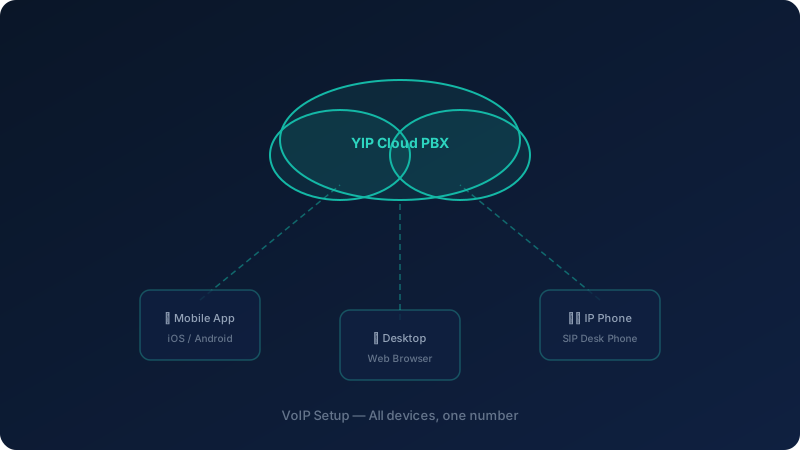
YIP WebPhone is a cloud-based VoIP (Voice over IP) phone system that replaces your traditional office phone with a software-powered solution that runs on any internet-connected device — desktop, laptop, tablet, or smartphone.
Instead of routing calls through copper telephone lines, YIP WebPhone routes them through your internet connection using the SIP protocol, delivering:
- HD voice quality — clearer than a standard landline
- One business number across all your devices
- Full PBX features — auto-attendant, extensions, call queues, voicemail-to-email
- Zero hardware dependency — no expensive desk phones required (though they're supported)
Key Features Explained
Auto-Attendant (Virtual Receptionist)
Your callers hear a professional greeting and are routed to the right department — Sales, Support, Accounts — without a human operator. Configure it in minutes from the web dashboard.
Call Recording
Every call can be recorded automatically and stored securely in the cloud. Use recordings for staff training, dispute resolution, and quality assurance. Recordings are searchable and downloadable.
HD Voice & Wideband Audio
YIP WebPhone uses the G.722 wideband codec, which delivers voice quality that is measurably clearer than traditional PSTN calls. Clients notice the difference — it signals professionalism.
Voicemail to Email
Missed calls don't get lost. Voicemails are transcribed and emailed to the relevant team member within seconds, so nothing falls through the cracks.
Analytics Dashboard
See call volumes by hour, average call duration, missed call rates, and team performance — all in a real-time dashboard. Use the data to optimise staffing and improve response times.
CRM Integration
YIP WebPhone integrates with leading CRM platforms, so your team sees the caller's history the moment the phone rings. Learn more about YIP CRM integration.
Load Shedding Resilience — A South African Priority
This is where cloud VoIP genuinely outperforms traditional systems. When load shedding hits your office:
- Your internet router (with UPS backup) stays online — most modern routers run for 4–8 hours on a small UPS
- YIP WebPhone automatically fails over to mobile — calls ring on your team's smartphones
- Clients experience zero disruption — they call the same number, it just rings on a different device
No generator required. No missed calls. No lost business.
Getting Started: Setup in Under 30 Minutes
Step 1 — Sign Up & Choose Your Plan
Visit sa-telecoms.co.za/yip-crm-software/ and select the plan that matches your team size. Plans start from a single user and scale to enterprise.
Step 2 — Port Your Existing Number (Optional)
Keep your current business number. SA Telecoms handles the porting process — typically completed within 5–7 business days with zero downtime.
Step 3 — Install the App
Download the YIP WebPhone app on desktop (Windows/Mac) or mobile (iOS/Android). Log in with your credentials. That's it — you're live.
Step 4 — Configure Your Auto-Attendant
Use the web dashboard to record your greeting, set up extensions, and configure call routing rules. Most businesses complete this in under 20 minutes.
Step 5 — Train Your Team
YIP WebPhone is designed to be intuitive. Most team members are comfortable within one session. SA Telecoms provides onboarding support at no extra cost.
Real Cost Savings: What South African Businesses Are Seeing
| Business Type | Old Monthly Cost | YIP WebPhone Cost | Saving |
|---|---|---|---|
| 10-person SME | R3,200 | R1,100 | 66% |
| 25-person call centre | R12,000 | R4,500 | 63% |
| 5-branch retail chain | R8,500 | R3,200 | 62% |
Figures are indicative based on typical SA Telecoms customer data.
Is YIP WebPhone Right for Your Business?
Yes, if you:
- Have a team of 2 or more people who handle calls
- Want to project a professional image without expensive hardware
- Have staff working remotely or across multiple locations
- Are tired of paying high per-minute rates on PSTN lines
- Need your phones to keep working during load shedding
Consider alternatives if you:
- Have no internet connectivity at your premises (though mobile data works too)
- Operate in a highly regulated environment with specific on-premise recording requirements
Ready to Make the Switch?
SA Telecoms offers a free demo of YIP WebPhone — no commitment, no pressure. Our team will walk you through the platform, answer your questions, and build a custom quote for your business.
Or visit the product page directly: sa-telecoms.co.za/yip-crm-software/
For general enquiries: sa-telecoms.co.za/contact/