What You'll Learn
- The real cost difference between VoIP and PSTN for South African businesses
- Why load shedding makes PSTN a liability and VoIP an asset
- Which features you get with VoIP that PSTN simply cannot offer
- How to migrate without disrupting your business operations
- What to look for in a South African VoIP provider
The State of Business Telephony in South Africa
South Africa has one of the highest business telephony costs in the developing world. A typical 10-person office running on traditional PSTN lines pays between R2,500 and R4,000 per month — for infrastructure that hasn't fundamentally changed since the 1970s.
Meanwhile, businesses on modern VoIP systems are paying R800 to R1,500 for the same (or better) capability.
The gap is widening every year. And with Eskom's ongoing load-shedding schedule, the case for cloud-based telephony has never been stronger.
PSTN: What You're Actually Paying For
PSTN (Public Switched Telephone Network) is the traditional copper-wire telephone network. When you plug a desk phone into a wall socket and dial out, you're using PSTN.
What PSTN costs you:
- Monthly line rental — typically R150–R300 per line, per month
- Per-minute call charges — billed by Telkom or your MVNO at rates that haven't dropped significantly in years
- Hardware maintenance — PABX systems require on-site technicians when they fail
- Upgrade costs — adding extensions means physical wiring and hardware
- Zero remote capability — your number only works at the physical location
What PSTN gives you:
- Reliable call quality (when the power is on)
- Wide compatibility with older equipment
- That's largely it
VoIP: What the Switch Actually Looks Like
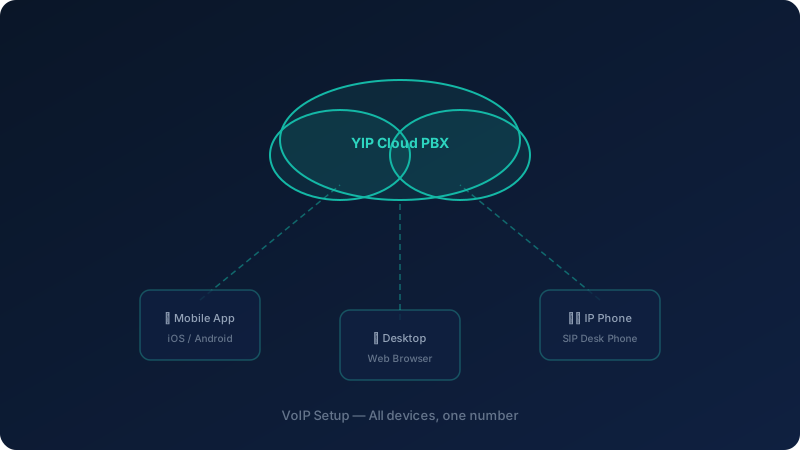
VoIP (Voice over Internet Protocol) routes your calls through your internet connection instead of copper telephone lines. Your voice is converted to data packets, transmitted digitally, and reassembled at the other end — all in real time.
Modern VoIP quality, using codecs like G.722 (wideband audio), is measurably clearer than PSTN. The "VoIP sounds bad" reputation comes from early 2000s implementations over slow ADSL connections. On a modern fibre or LTE connection, VoIP is indistinguishable from — or better than — a landline.
What VoIP costs you:
- A monthly subscription per user or per line (typically R80–R250/user/month)
- Your existing internet connection (no additional infrastructure)
- No hardware required (software apps on existing devices)
What VoIP gives you:
- All the features of an enterprise PABX, included
- Calls from any device, anywhere
- Instant scalability — add users in minutes, not days
- Full call analytics and reporting
- Load-shedding resilience (see below)
The Load-Shedding Factor: A South African-Specific Argument for VoIP
This is the argument that closes the deal for most South African businesses.
What happens to your PSTN system during load shedding:
Your PABX runs on mains power. When the power goes out, so does your phone system. Even if you have a UPS, most PABX units aren't designed for extended battery operation. After 30–60 minutes, your office phones go dead.
Clients calling your business number hear: nothing. Or a busy signal. Or a generic "number unavailable" message.
What happens to your VoIP system during load shedding:
- Your internet router (on a small UPS) stays online — most routers run 4–8 hours on a R500 UPS
- Your VoIP calls automatically route to your team's mobile devices
- Clients call the same number, it rings on your team's smartphones
- Business continues uninterrupted
No generator. No missed calls. No lost revenue.
For businesses in areas with Stage 4–6 load shedding, this alone justifies the switch.
Feature Comparison: VoIP vs PSTN
| Feature | PSTN | VoIP |
|---|---|---|
| HD voice quality | No | Yes |
| Auto-attendant (IVR) | Expensive add-on | Included |
| Call recording | Expensive add-on | Included |
| Voicemail to email | No | Yes |
| Mobile app (work from anywhere) | No | Yes |
| Call analytics dashboard | No | Yes |
| Load-shedding resilience | No | Yes |
| Add new extensions | Days + hardware cost | Minutes, no hardware |
| International calling rates | High | Low |
| CRM integration | No | Yes |
Real Cost Comparison: A 10-Person Business
PSTN setup (typical SA business):
- 3 PSTN lines × R250/month = R750
- Per-minute charges (est. 2,000 min/month) = R1,200
- PABX maintenance contract = R600
- Total: ~R2,550/month
VoIP setup (SA Telecoms):
- 10 users × R120/month = R1,200
- Calls included in plan
- No hardware maintenance
- Total: ~R1,200/month
Monthly saving: R1,350 (53%)
Over 12 months: R16,200 saved — enough to fund a significant business investment.
How to Migrate: A Practical 5-Step Guide
Step 1 — Audit Your Current Setup
List every phone line you're paying for. Check your Telkom or MVNO invoice carefully — many businesses are paying for lines they don't use.
Step 2 — Choose Your VoIP Provider
Look for:
- Local South African provider (support in SAST, data stays in SA, POPIA compliant)
- Proven load-shedding resilience (mobile failover, not just a promise)
- Transparent pricing (per-user, not per-minute surprises)
- Number porting (keep your existing business numbers)
SA Telecoms' YIP WebPhone ticks all of these boxes.
Step 3 — Port Your Numbers
You keep your existing business numbers. The porting process typically takes 5–7 business days. During this time, both systems run in parallel — no calls are lost.
Step 4 — Install and Configure
With a cloud VoIP system, "installation" means downloading an app. Your team installs the YIP WebPhone app on their desktop or mobile, logs in, and they're live. Configure your auto-attendant, extensions, and call routing from the web dashboard — no technician required.
Step 5 — Cancel Your PSTN Lines
Only after you've confirmed everything works. Keep your old lines active for 30 days as a safety net, then cancel.
What to Look for in a South African VoIP Provider
Not all VoIP providers are equal. Here's what matters specifically for South African businesses:
Local data centres — your calls should route through South African infrastructure, not overseas servers. This reduces latency and keeps you POPIA compliant.
Mobile failover — explicitly ask: "What happens to my calls during load shedding?" If the answer isn't "they route to mobile automatically," keep looking.
Number porting — you should be able to keep your existing 010, 011, 021, or 031 numbers.
Local support — an offshore call centre that can't actually fix your problem is worse than no support. SA Telecoms support is based in South Africa.
Month-to-month options — avoid 24-month lock-in contracts until you've tested the service.
Ready to Make the Switch?
SA Telecoms offers a free, no-obligation demo of YIP WebPhone. Our team will walk you through the platform, show you exactly what you'd save, and handle the entire migration process.